Best AI Tools for Indie Founders in 2026
· 9 min read
I run four different jobs off the same laptop most weeks. There's CreatorBit, the SaaS I'm building for the creator economy. There's Ganlary Labs, my freelance shop, where I'm building MVPs and AI features for other people's businesses. There's my actual day job as an MIS & Data Analyst on a rural development programme in Arunachal Pradesh, where I write Python scripts that turn field reports into something a funder can read. And somewhere in between, there's this blog.
None of that works without a specific stack of AI tools. Not a hypothetical stack — the tabs I actually have open right now, the subscriptions I actually pay for, and a few I tried and quietly cancelled. Most "best AI tools" posts read like they were assembled from fifteen other "best AI tools" posts, which is why they all recommend the same twenty tools with the same one-line description lifted from the landing page. I wanted to write the version that tells you which ones earn their keep when the work is real — client deadlines, government reporting formats that don't forgive mistakes, and a solo SaaS with no team to catch what I miss.
This is organized by the actual job each tool does in my week, not by hype.
Research and Thinking: ChatGPT, Perplexity, and Where I Skip TrendHunter
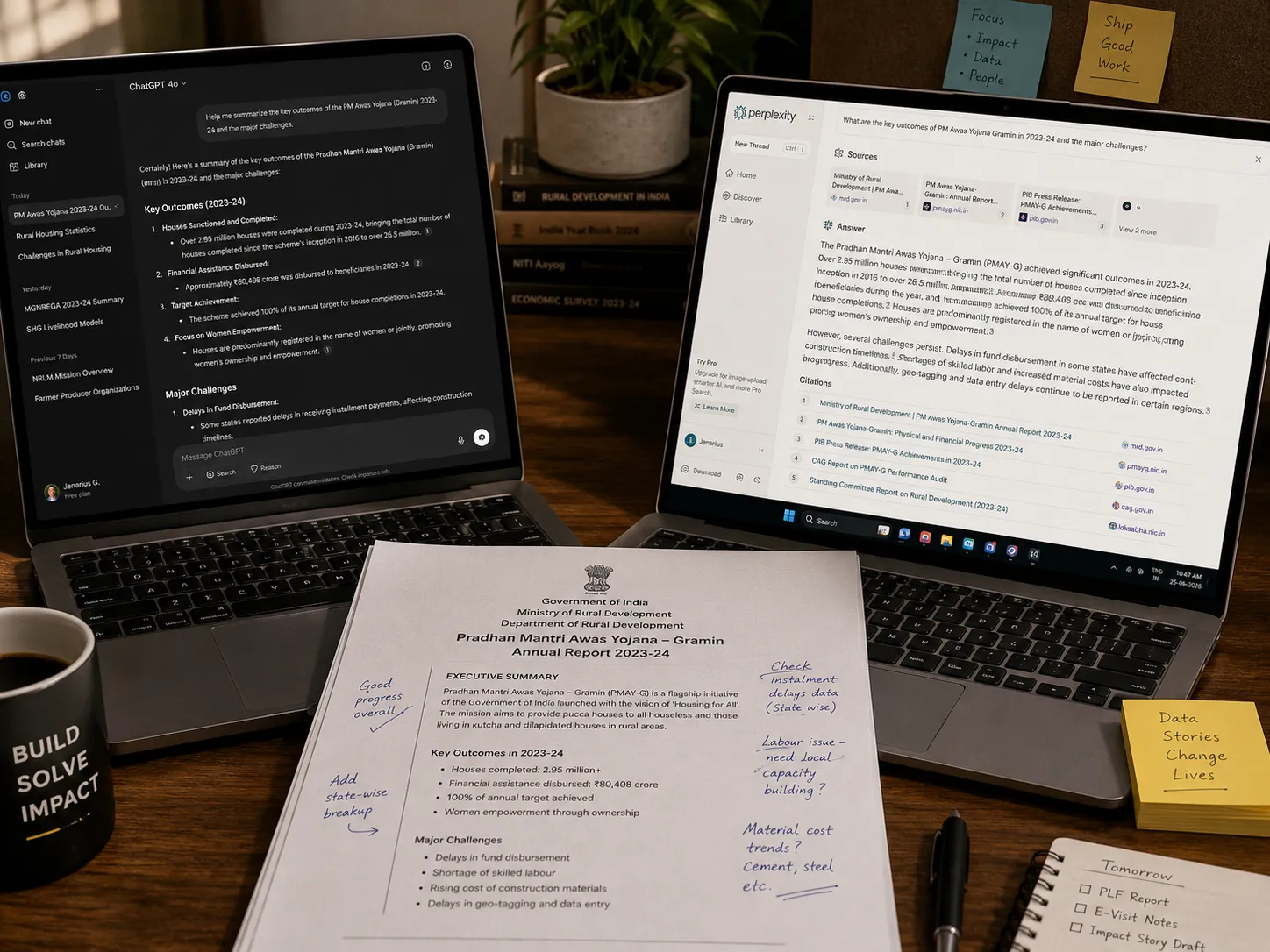
ChatGPT is still where I do the messy first draft of thinking. When I'm scoping a new CreatorBit feature or trying to figure out how to phrase a tricky section of an HRDP quarterly report, I open ChatGPT before I open anything else. It's not because it's smarter than the alternatives — it's because the conversation history is long and searchable, and half the value is being able to go back and find a thread from three weeks ago.
Perplexity AI does one job better than ChatGPT for me: anything where I need a citation I can actually check. When a freelance client asks me to justify a tech stack decision, or when I need current pricing for a competitor comparison, Perplexity's source links save me from having to verify claims manually afterward.
I tried TrendHunter AI for a few weeks when I was scouting ideas for CreatorBit's content calendar. Honestly, it never became a habit. The trend signal was too broad for a niche as specific as creator-economy tooling — I got more useful signal from just reading what indie hackers were actually complaining about on X and in Discord communities. I still have the account, but I couldn't tell you the last time I opened it.
Building the Product: Claude, Claude Code, GitHub Copilot, Cursor, Replit Agent, and Manus AI
This is where the real money question lives, and it's also where I've changed my mind the most times.
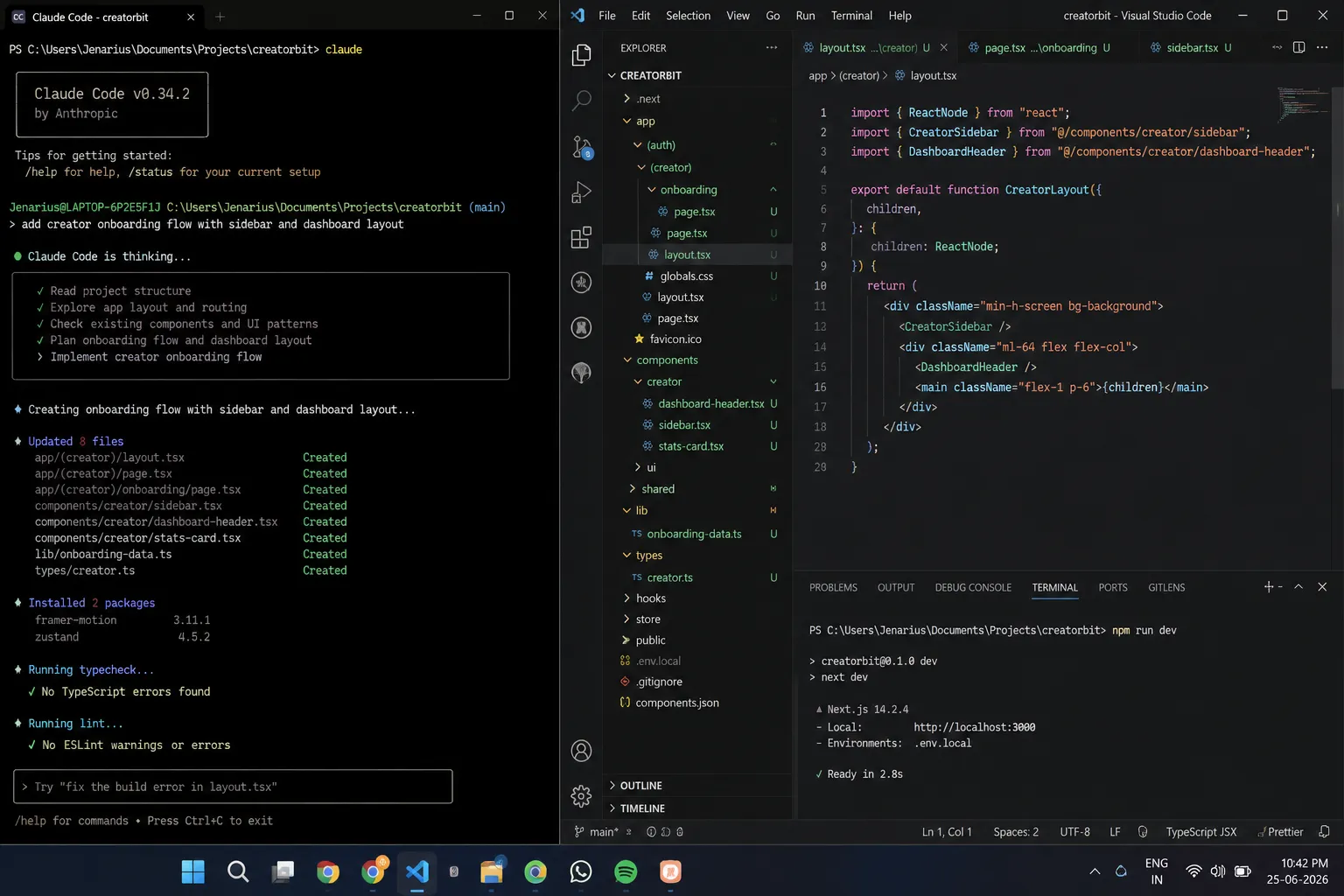
Claude is where I do the thinking before the coding — architecture decisions, database schema arguments I'm having with myself, and writing documentation I actually want to read later. Claude Code is a different tool with a different job: it lives in my terminal and does the actual implementation work across CreatorBit's codebase. The distinction matters more than it sounds. I use Claude for "should I structure this as one table or two," and Claude Code for "now go make that change across these twelve files and don't break the Supabase RLS policies."
GitHub Copilot is still running in VS Code out of habit more than anything else at this point — the inline completions are genuinely good for boilerplate, and I'm not paying extra to turn it off. But if I had to cut one tool from this list to save money, Copilot goes before Claude Code does, because the two overlap more than I'd like to admit, and Claude Code wins the overlap.
Cursor I use less than you'd expect given how much the indie hacker crowd talks about it. I tried switching my main editor over for a month and drifted back to VS Code with Copilot plus a Claude Code terminal split — not because Cursor is worse, but because retraining muscle memory mid-project on CreatorBit wasn't worth the productivity dip during a stretch when I had freelance deadlines stacked up.
Replit Agent earns its place specifically for freelance client work through Ganlary Labs. When a client wants to see a rough proof of concept before committing to a scoped build, Replit Agent gets me something clickable in an afternoon that I can put in front of them. I would never ship CreatorBit production code out of it, but for "does this idea even make sense" conversations with clients, it's the fastest path to something tangible.
Manus AI is the newest addition and the one I'm still testing the edges of. I've used it for longer-running research and multi-step tasks where I want something working in the background while I'm doing HRDP fieldwork coordination — the kind of task where I don't need to babysit every step, just check the output at the end. It's not yet load-bearing for CreatorBit, but it's earned a place I didn't expect it to a few months ago.
Design Without a Designer: Figma AI, Uizard, and Galileo AI
I'm not a designer, and CreatorBit doesn't have one yet, so this category is about closing the gap without hiring.
Figma AI is where final designs live once I know roughly what I want — it's less a generation tool for me and more a cleanup and auto-layout tool. I sketch rough, and Figma AI handles the parts of professional polish I'd otherwise be Googling tutorials for.
Uizard is what I reach for earlier than that, when I have a vague idea and need a wireframe fast enough to talk through with a freelance client on a call. The output isn't something I'd ship, but it's fast enough to use live during a scoping conversation.
Galileo AI overlaps with both of these more than the marketing suggests, and honestly, if I only kept one of the three, it would be Figma AI, because it's the one that produces something closest to final. Galileo is the one I'd cut first here if I were trimming the budget.
Content and Marketing: Jasper, Copy.ai, and Where Claude Wins Anyway
I'll be honest about this category: Jasper and Copy.ai see less use from me than the infographic version of "my stack" would suggest. I have accounts for both, and I use them for specific jobs — Copy.ai for quick ad variations when I'm testing CreatorBit landing page copy, Jasper for longer-form drafts when I need something in a brand voice I've already trained it on.
But for this blog, and for most of CreatorBit's actual copy, I write in Claude and edit by hand. The reason is simple: Jasper and Copy.ai are built to sound confident and finished immediately, and that's exactly the wrong instinct for writing that's supposed to sound like one specific person who admits when something didn't work. If you're running a blog like this one, where the voice is the point, a general-purpose tool you can push around in a long conversation beats a tool optimized to sound "good" by default.
Running the Business: Notion, Zapier, and Trello with Butler AI
Notion is the closest thing I have to an operating system. Product decisions for CreatorBit, HRDP field notes, freelance client scopes and invoices, this blog's editorial calendar — it all lives in one connected workspace. If I lost access to every other tool on this list and could keep one, it would probably be Notion, just because so much institutional memory lives there.
Zapier connects the pieces I don't want to babysit manually — new Ganlary Labs client inquiries landing in Notion automatically, form submissions triggering a Slack notification, that kind of thing. It's not exciting, but the hours it saves are real and compound over a year.
Trello with Butler AI runs client project boards specifically, separate from Notion's internal use. Clients understand Trello faster than they'd understand my Notion setup, and Butler's automation rules mean cards move between "In Review" and "Approved" without me manually dragging things during a week when I'm mostly in the field for HRDP work.
Watching What Actually Works: Mixpanel, Amplitude, and Hotjar
This is the category I'm least confident recommending, because CreatorBit doesn't have enough users yet for the data to be dramatic. I run Mixpanel for event tracking on core actions, and it's the one I'd defend keeping even at low volume, because the habit of instrumenting events from day one matters more than what the dashboard shows you in month two.
Amplitude I set up in parallel mostly to compare the two before committing — at CreatorBit's current stage, running both is redundant, and if you're earlier than I am, I'd say pick one and skip this section's indecision.
Hotjar is genuinely useful even pre-scale, because session recordings tell you where someone got confused in a way that event data alone doesn't. Watching three real people fumble the same onboarding step told me more in twenty minutes than a week of Mixpanel dashboards did.
The Tools I Reach for Less Often: Whisper, Loom AI, Runway ML, Speechify, and Midjourney
These are real tools in real rotation, just not daily ones. Whisper transcribes voice notes I record while commuting between Sagalee Block field sites, which then become the raw material for HRDP reports later. Loom AI handles async updates for freelance clients so I don't need to schedule a call for something a five-minute video explains better. Runway ML and Midjourney cover visual assets when CreatorBit needs something and I don't want to commission it. Speechify I use less for output and more for input — feeding it long technical documentation I need to absorb during a commute instead of at a desk.
None of these are load-bearing the way Notion or Claude Code are. But cutting them would cost me real time, just spread thin enough that it's easy to underrate.
What I'd Cancel First If Money Got Tight
If I had to trim this stack to survive a lean month, here's the honest order: TrendHunter AI goes first, since I barely use it. Galileo AI goes next, since Figma AI covers most of the same ground. Amplitude goes third — running two analytics platforms in parallel was always meant to be temporary. Everything past that gets harder, because Notion, Claude, Claude Code, and Mixpanel have become genuinely load-bearing across CreatorBit, Ganlary Labs, and my actual day job.
If you're earlier in your build than I am, that ordering is probably useful information: start with a thinking tool (Claude or ChatGPT), a coding agent if you're technical, and Notion to hold it all together. Everything else on this list is something you add once a specific job actually needs it, not before.
For a narrower breakdown of the coding side specifically, 5 Tools Every Solo Developer Should Actually Pay For goes deeper into that half of the stack, and see more SaaS & AI Tools posts if this kind of breakdown is useful to you.
FAQ
Frequently asked questions
What are the best AI tools for indie founders in 2026?
For most solo founders, the essential stack is a reasoning tool like Claude or ChatGPT for thinking and drafting, a coding agent like Claude Code or Cursor if you're technical, and Notion as the connective workspace holding product decisions, client work, and documentation together. Everything beyond that — design, analytics, content, automation — should be added only once a specific recurring job justifies the subscription.
How many AI tools does a solo founder actually need?
Fewer than most "best of" lists suggest. A working stack can run on four or five core tools; the rest tend to be situational additions for specific client work or specific product stages, and many of them see irregular use even when they're genuinely useful.
Is it worth paying for both Claude and GitHub Copilot?
It depends on how they're used. If Copilot is mainly handling inline autocomplete and Claude Code is handling multi-file implementation and architecture reasoning, the overlap is smaller than it looks and both can earn their keep. If they're doing the same job, one of them is redundant — usually the autocomplete tool, once you're comfortable working from a terminal-based coding agent.
What AI tools do indie hackers use for design if they're not designers?
A combination of a fast wireframing tool for early client or investor conversations (like Uizard) and a more finished tool for near-final layouts (like Figma AI) covers most non-designer needs. Running more than two tools in this category is usually redundant unless you have a specific reason to compare them.
Written by Jenarius Ganlary
Full-stack developer and MIS & Data Analyst, building CreatorBit and freelancing through Ganlary Labs. Writing about SaaS, AI, and startups as it happens.
More about me →KEEP READING