MCP Server Security: How I Vet Servers Before Installing
· 8 min read
I added three new MCP servers to my Claude Code setup last month without reading a single line of their source. One was a GitHub integration, one touched my Supabase project, one was a random productivity tool I found linked from a tweet. It took me about four minutes total. It wasn't until I read about the stdio RCE disclosure that hit the MCP ecosystem in April 2026 that I went back and actually looked at what I'd installed.
That's the uncomfortable truth about MCP adoption right now: the ecosystem grew from roughly 14,000 servers in May to over 22,000 by mid-July, and almost none of that growth came with the kind of vetting habits people already have for npm packages or browser extensions. If you're a solo developer wiring MCP servers into Claude Code, Cursor, or your own agent stack, the honest answer to "is MCP safe" is: it's exactly as safe as the least-trustworthy server you've connected, and nothing in the protocol stops a bad one from doing real damage.
What Actually Happened With the MCP stdio Vulnerability
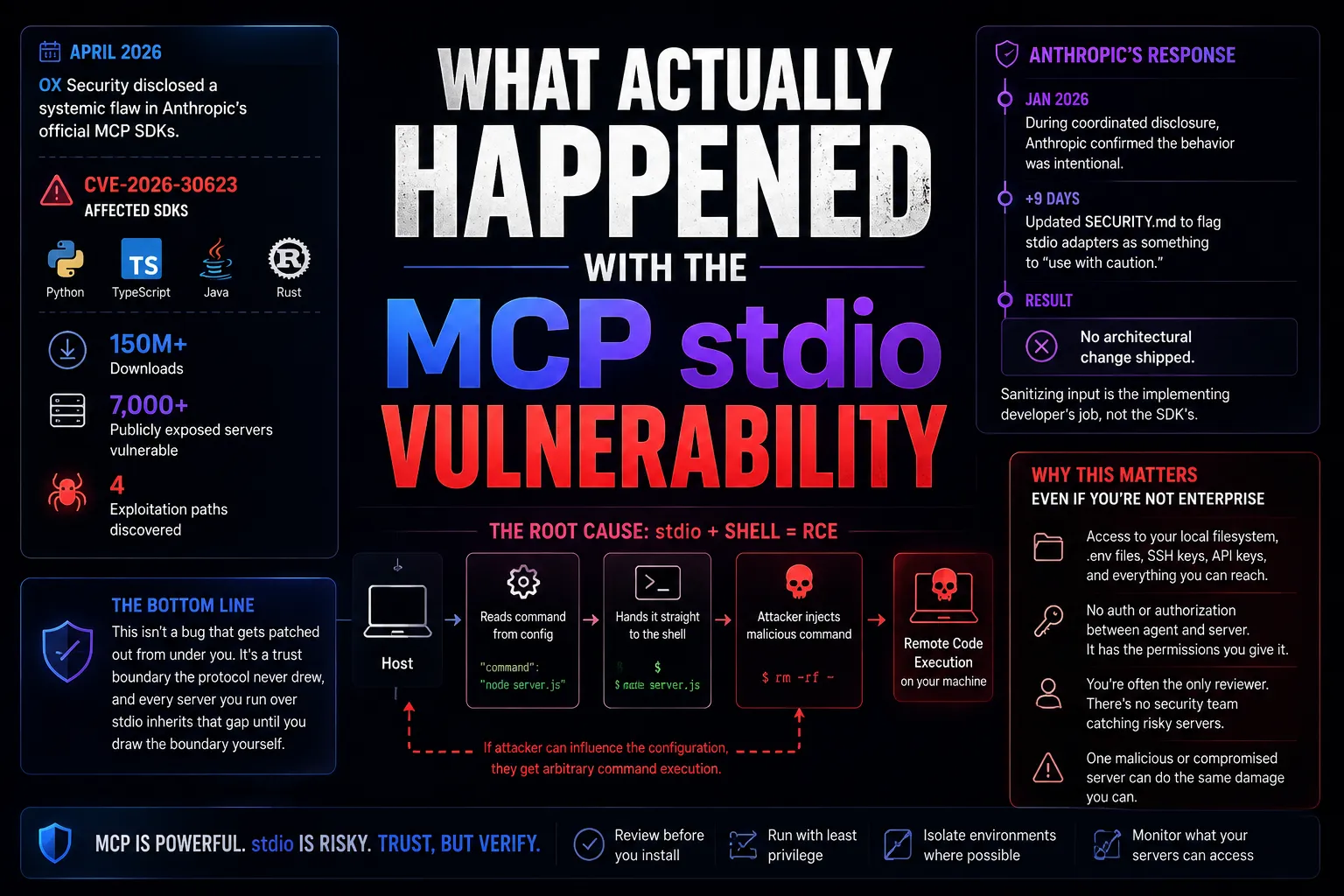
In April 2026, OX Security disclosed a systemic flaw in Anthropic's official MCP SDKs — Python, TypeScript, Java, and Rust — tracked as CVE-2026-30623. The root cause is simple to describe: when a host launches an MCP server over stdio, it reads a command string from configuration and hands it straight to the shell without sanitizing it. If an attacker can influence that configuration value, they get arbitrary command execution on your machine.
The scale is what made this a story beyond the usual CVE churn. OX estimated the affected SDKs account for over 150 million downloads and identified more than 7,000 publicly exposed servers vulnerable to some variant of the exploit. Four separate exploitation paths were found, all tracing back to the same design decision.
What I found more unsettling than the bug itself was Anthropic's response. During coordinated disclosure in January 2026, Anthropic confirmed the behavior was intentional — their position is that stdio execution is a secure default as long as developers restrict what can land in the command field, and that sanitizing input is the implementing developer's job, not the SDK's. Anthropic updated its SECURITY.md nine days later to flag stdio adapters as something to "use with caution." No architectural change shipped.
In other words: this isn't a bug that gets patched out from under you. It's a trust boundary that the protocol never drew, and every server you run over stdio inherits that gap until you draw the boundary yourself.
Why This Matters Even If You're Not Running an Enterprise Fleet of Agents
Most of the writing on MCP security right now is aimed at enterprise security teams — SOC dashboards, centralized MCP gateways, policy-as-code. If you're one person running Claude Code on your own laptop, or installing MCP servers into a freelance client's environment, that framing doesn't map to your actual risk.
Your real exposure looks different: it's your local filesystem, your .env files, your Supabase service role key sitting in an environment variable, your SSH keys, your client's staging database credentials. An MCP server with stdio access on your machine doesn't need a sophisticated attack chain — it has the same reach you do. The MCP spec doesn't require authentication or authorization between an agent and a server, so whatever permissions you hand a server, it keeps until you revoke them.
The other risk that's specific to solo and freelance work: you're often the only reviewer. There's no security team checking what you install before it touches a client's infrastructure. That review either happens or it doesn't, and it's on you either way.
The Checklist I Actually Run Before Installing a Server
This isn't a theoretical framework. It's what I now do every time, and it takes maybe ten minutes for a small server.
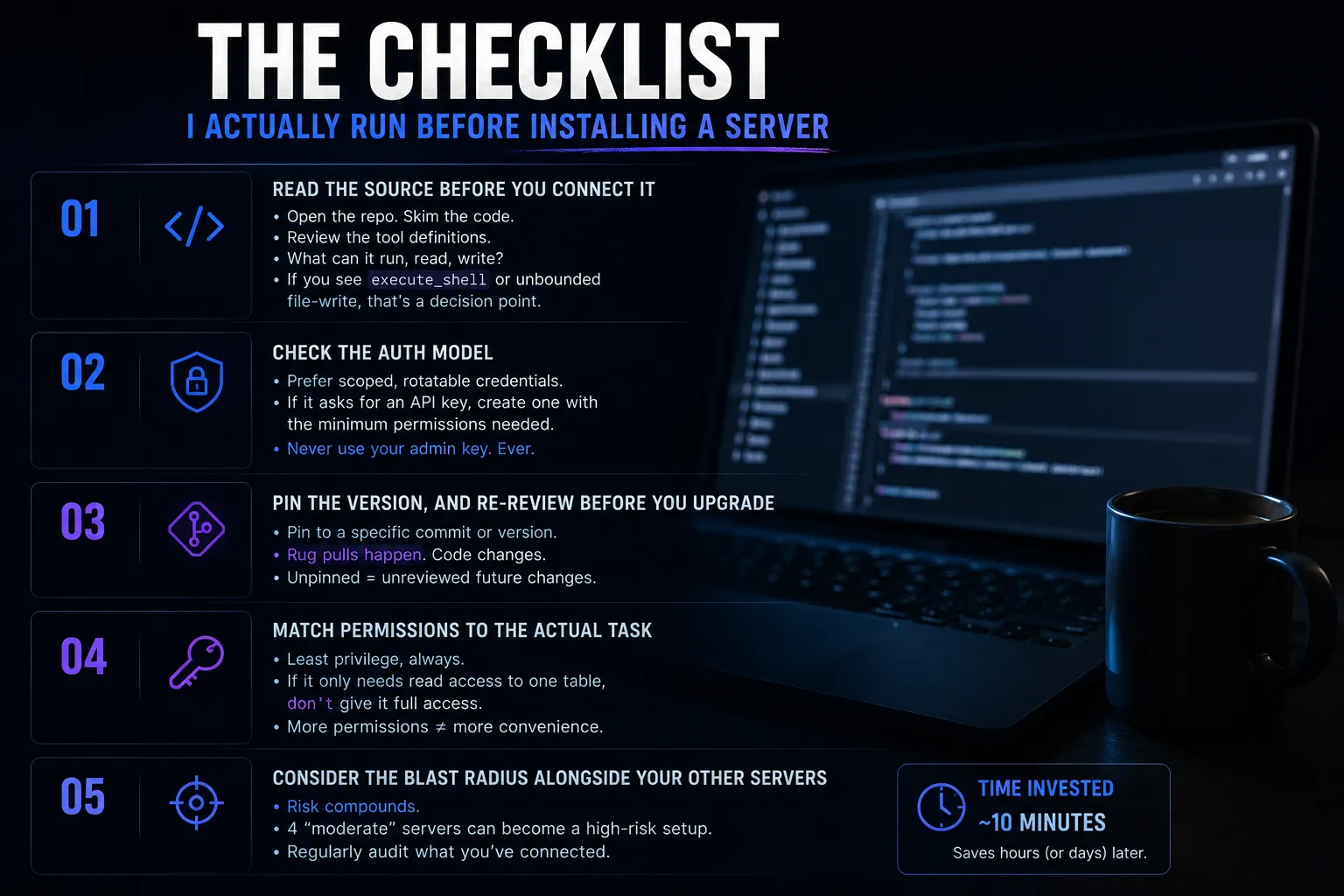
Read the source before you connect it. Most MCP servers are a few hundred lines of code. If it's open source, actually open the repo and skim the tool definitions — what commands can it run, what does it read, what does it write. If a server's tool list includes something like execute_shell or an unbounded file-write, that's a decision point, not a formality.
Check the auth model. Prefer servers that support scoped, rotatable credentials over ones that want a single long-lived static token. If a server asks for an API key, generate one with the minimum permissions the task actually needs. Don't hand it your admin key because scoping one down felt like extra work — I've done this myself under deadline pressure, and it's the wrong tradeoff every time.
Pin the version, and re-review before you upgrade. A server that looked clean during your first review can change later — this is sometimes called a rug pull, where a maintainer (or a compromised maintainer account) ships different behavior in a later release than what you approved. Unpinned dependencies mean you're trusting every future version sight unseen.
Match permissions to the actual task. If a server only needs to read from one Supabase table, don't connect it with a key that can write to all of them. This sounds obvious written down. It's the thing I skip most often when I'm moving fast.
Consider the blast radius alongside your other servers. A moderately risky server combined with three other moderately risky servers, all with stdio access to the same machine, is not a moderate risk overall. I stopped thinking about each new server in isolation once I had more than four or five connected at once.
Red Flags That Make Me Walk Away
A few patterns have made me uninstall a server before I finished the review, and I'd rather flag them explicitly than leave the checklist purely positive.
A tool list that's broader than the server's stated purpose is the biggest one. If something markets itself as a "notes sync" server but its tool definitions include arbitrary file read and shell execution, the marketing and the actual capability don't match, and that mismatch is the whole risk. Same with a maintainer account with no history beyond the server itself — no other repos, no commit history predating the MCP boom, an account created in the last few months. That's not proof of anything malicious, but it removes the one signal (reputation) that would otherwise let you skip a full source review.
I also walk away from anything that requires disabling a permission prompt or approving broad scopes "to work properly." A server that needs admin-level access to do something that should only need read access is asking you to take on risk it hasn't earned. And I don't install anything through a registry listing alone — typosquatting and dependency confusion on MCP server names are already documented problems, so a name that's one character off from a well-known server is worth double-checking before you assume you found the real one.
What I Do Differently on Client Work
For my own projects, I'll tolerate a bit more risk with servers I'm actively testing — it's my own data on the line, and I know what's connected. For freelance client work, the bar goes up. I don't install anything I haven't personally read the source for, I never reuse a client's admin-level key for an MCP connection, and I don't leave test servers connected after the engagement ends. A client's staging environment turning into an incident because I installed something convenient is not a conversation I want to have, and "the MCP protocol doesn't require authentication by default" is not an explanation a client is going to find reassuring.
If a client asks whether the AI tooling I'm using is secure, "I read the source and scoped the keys" is a real answer. "It came from the official registry" is not — the registry doesn't vet for you, and typosquatting and dependency confusion attacks on MCP package names are already a documented problem.
The Part of MCP's Design I'd Push Back On
I like MCP. It's the reason connecting an agent to a real tool doesn't mean writing a bespoke integration every time, and the ecosystem growth — remote HTTP servers now outpacing stdio in new deployments, services like GitHub, Vercel, Stripe, and Supabase shipping OAuth-secured remote servers — is a genuinely good trend, because OAuth-based remote servers sidestep a lot of the stdio trust boundary problem entirely.
But I don't think "sanitize your own input" is a reasonable default for a protocol this widely adopted, this fast, by people who are not security engineers. Most of the developers installing MCP servers right now are exactly the audience least equipped to independently reason about shell injection risk in a config field. A secure default should assume that. Until the protocol changes, the checklist above is the closest thing to a substitute.
If you're choosing between AI coding tools generally and trying to figure out where MCP fits into that stack, I wrote about the broader landscape in AI Coding Agents for Solo Developers — MCP server security is really just one layer of a bigger set of tradeoffs you're making every time you plug something new into your agent.
For more $SAAS coverage like this, see more SaaS & AI Tools posts.
FAQ
Frequently asked questions
Is MCP safe to use?
MCP itself is safe as a protocol, but individual MCP servers vary widely in trustworthiness because the spec doesn't require authentication or authorization by default. Safety depends on which servers you connect, what permissions you grant them, and whether you've reviewed their source — not on the protocol name alone.
What was the April 2026 MCP stdio vulnerability?
Tracked as CVE-2026-30623, it's a design-level flaw in Anthropic's official MCP SDKs where a server's launch command is passed to the shell without sanitization, allowing arbitrary command execution if an attacker can influence the configuration. It affects Python, TypeScript, Java, and Rust SDKs and was disclosed by OX Security in April 2026.
How do I know if an MCP server is safe to install?
Check that its source code is readable and reasonably small, that it supports scoped and rotatable credentials rather than a single static token, that its maintainer has a verifiable track record, and that you can pin its version rather than auto-updating. If any of those checks fail, treat it as higher risk.
Should solo developers and freelancers worry about MCP security as much as enterprises do?
Yes, arguably more, because there's usually no second reviewer catching what you install. The risk is different in shape — your own filesystem, environment variables, and client credentials rather than a centralized fleet — but the exposure is just as real, and you're the only line of defense.
Written by Jenarius Ganlary
Full-stack developer and MIS & Data Analyst, building CreatorBit and freelancing through Ganlary Labs. Writing about SaaS, AI, and startups as it happens.
More about me →KEEP READING