Why I Write a Problem Statement Before I Write Code
· 8 min read
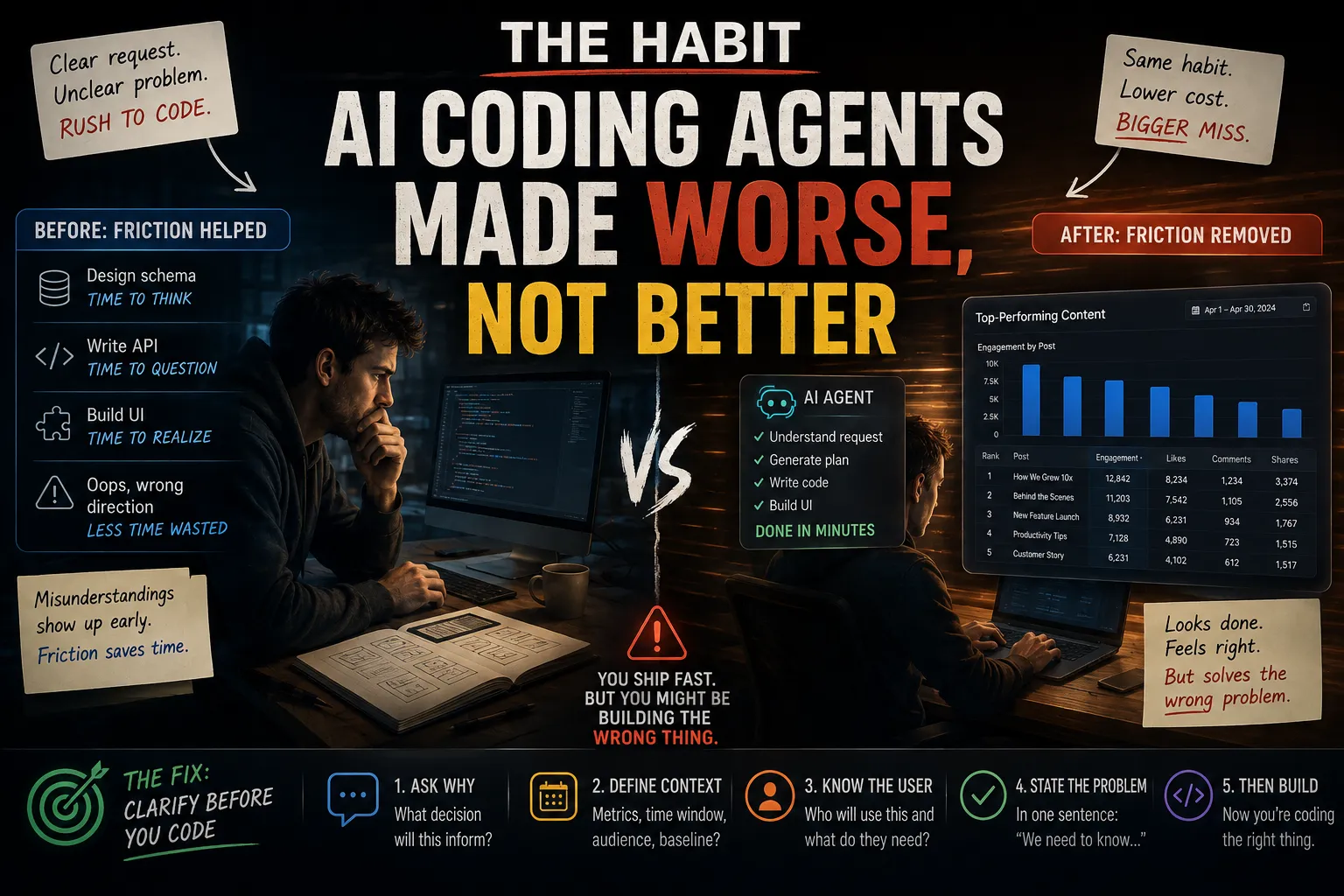
A client once sent me a message: "Can you add a dashboard that shows our top-performing content?" I opened Claude Code, described the request, and had a working chart in about twenty minutes — sortable table, a bar chart of engagement by post, a date range picker. I sent a Loom. They watched it, said thanks, and never opened it again.
Three weeks later, in a call about something unrelated, it came out what they'd actually wanted: a single number, refreshed weekly, telling them whether last week beat the week before. Not a dashboard. A comparison. I'd built the thing they described and missed the problem underneath it, and I'd done it fast enough that I never stopped to ask what "top-performing content" was supposed to help them decide.
That gap — between what someone asks for and what they're actually trying to solve — isn't new. What's new is how easy AI coding agents make it to close the distance between "I have a request" and "I have working code" without ever stopping in between. You used to have to at least sit with a problem long enough to design a data model and write the boilerplate. Now you can go from vague request to demo-able feature in the time it takes to describe it. The friction that used to force a pause is gone, and nothing replaced it.
The Habit AI Coding Agents Made Worse, Not Better
I don't think agentic tools caused this problem. Developers have always been tempted to start coding before they fully understand what they're solving — it's a well-worn habit that predates any AI tool. What's changed is the cost of giving in to it.
Before, if you misunderstood a requirement, you'd usually notice partway through — while designing the schema, while writing the API contract, somewhere in the friction of building it by hand. That friction was accidentally doing useful work: it gave you time to notice the request didn't fully make sense before you'd sunk hours into it.
Agentic coding tools remove that friction on purpose, which is exactly the point of them. But it means the moment where you'd have caught a misunderstood problem — the slow part — mostly doesn't exist anymore. You can prompt your way to a plausible-looking feature before you've asked a single clarifying question, and a plausible-looking feature is much harder to walk back than a half-written one, because it looks done. I wrote more about where the old fundamentals still matter with these tools in Vibe Coding Doesn't Skip the Fundamentals — this is the specific failure mode that shows up most on client work.
"I Understood the Request" Is Not "I Understood the Problem"
The dashboard request was clear. I understood every word of it. What I didn't have was the problem behind it — why they wanted it, what decision it was supposed to inform, what "top-performing" even meant to them. Those weren't things I could get from the sentence they typed. They were things I had to ask about, and I skipped asking because the request already sounded actionable enough to start on.
This is the trap: a request can be perfectly well-specified as a sentence and still be missing the one piece of context that determines whether you're building the right thing. "Top-performing content" sounds specific. It isn't. Performing by what measure, over what window, compared to what baseline, read by whom? None of that was in the message, and none of it was hard to ask for — I just didn't, because asking felt slower than building.
The tell, in hindsight, was that I could picture the UI before I could explain the decision it supported. That's usually backwards. If you can sketch the interface faster than you can state what question it answers, you don't have a problem yet — you have a shape.
This Isn't the Same Thing as Market Validation
It's worth being precise about what this is and isn't, because they get conflated. I've written before about why market research reports aren't a business plan — that post is about validating whether a problem is worth solving at all, before you commit weeks to it. This is a narrower, more mechanical failure, and it happens even when the problem is completely real and already validated.
The client's problem was real. They genuinely needed to know if their content was improving week over week. Nobody needed to be convinced that was worth solving. The failure wasn't "should I build this" — it was "what, specifically, does this need to do," and I answered that question by guessing instead of asking, because guessing was faster and the agent made the guess look finished. Validation tells you whether to build. A problem statement tells you what to build. Skipping the second one doesn't show up in a market research report — it only shows up when the thing ships and nobody uses it, by which point it looks identical to a validation failure even though the cause was completely different.
The Problem Statement I Actually Write Now
I don't do this for every task — fixing a bug or adjusting a button's color doesn't need a written problem statement, and pretending it does is its own kind of theater. I do it for anything where I'm about to generate a meaningful chunk of new functionality, especially on client work where the person asking isn't techical enough to specify their own edge cases.
Before I open an agent for a new feature, I write four lines, usually directly in the ticket or Slack thread:
Problem: what decision or action does this unblock, for whom, specifically?
Current state: what are they doing today instead — nothing, a spreadsheet, a manual check?
Success: how will they know this worked, one week after it ships?
Not this: what's the version of this I'm explicitly not building?
For the dashboard, if I'd written this before touching Claude Code, it would have looked like:
- Problem: the founder wants to know, at a glance, whether last week's content beat the week before — this feeds a weekly team update.
- Current state: manually checking analytics and eyeballing the trend, which takes them ten minutes and they've stopped doing consistently.
- Success: they can answer "did we do better this week" in under five seconds, without opening analytics.
- Not this: a full dashboard with per-post breakdowns, filters, or historical charts — that's a different, bigger feature.
That's not a spec. It's four sentences. But it would have taken the request from "add a dashboard" to "add one comparison number," which is a completely different build, a fraction of the code, and the thing they actually needed. Writing it forces the one question an agent will never ask on your behalf: is this actually what solves the problem, or is it just a plausible answer to the literal words in the request?
What Skipping This Actually Costs
The dashboard itself took twenty minutes to build. The real cost wasn't that twenty minutes — it was the three weeks it sat unused, the follow-up call where the real problem finally surfaced, and the second build, which took longer than the first because now I had to work around code that existed and half-worked instead of starting clean. Rebuilding around something is almost always slower than building it right the first time, and "half-working" AI-generated code is worse to rebuild around than nothing at all, because it's tempting to salvage pieces of it that don't actually fit the real problem.
There's a compounding cost too, specific to freelance and contract work: every misfire like this spends trust. The client didn't say anything critical after the dashboard — they just quietly stopped mentioning what else they needed, and I had to notice that and ask directly. A pattern of shipping technically-correct answers to the wrong question is a slower, quieter way to lose a client than shipping buggy code, and it's harder to notice happening in real time.
Where This Doesn't Apply
I want to be honest about the limits of this, because "always write a problem statement" is its own kind of bad advice. It's overkill for bug fixes, for tasks where the requester is technical and already specified the edge cases, for internal tooling only you'll ever use, and for anything small enough that the cost of a wrong guess is a five-minute redo. The four-line version above is for the specific case where you're about to spend real time generating something meaningful and the requester isn't the one who has to think through the edge cases. If both of those aren't true, skip it — writing a problem statement for a one-line CSS fix is just procrastination wearing a process costume.
Where This Leaves Me
I still use agents for almost everything I build now, including client work — that hasn't changed. What changed is where I let them start. They're excellent at turning a well-understood problem into working code fast. They're just as good, and just as fast, at turning a misunderstood request into working-looking code, and the two outputs are indistinguishable until someone tries to actually use it. The four lines above are the cheapest insurance I've found against the second case, and they take less time to write than this paragraph took to read.
If you're figuring out your own process for deciding what to build and how, I've also written about how I decide what to build next as a solo founder, which covers the adjacent question of prioritization once you already know the problem is real. For more on the practical side of engineering life, see more Tech & Developer Life posts.
FAQ
Frequently asked questions
Why do AI coding agents make it easier to build the wrong thing?
Agents remove the friction that used to force a pause between a request and working code — designing a schema, writing boilerplate, thinking through an API contract. That friction used to give developers time to notice a misunderstood requirement before committing hours to it. With an agent, you can go from a vague request to a demo-able feature almost instantly, so the moment where misunderstandings used to surface often doesn't happen anymore.
What's the difference between validating an idea and writing a problem statement?
Validation answers whether a problem is worth solving at all — usually before you've committed real time to it. A problem statement answers what, specifically, needs to be built once you already know the problem is real. You can skip validation and still build the right thing by luck; you can validate perfectly and still build the wrong feature if you never pin down what success actually looks like for that specific request.
How do I write a problem statement without slowing down every task?
Reserve it for work where you're about to generate meaningful new functionality and the person requesting it isn't specifying the edge cases themselves — new features, client requests, ambiguous tickets. Four short lines are usually enough: the actual problem and who it's for, what they do today instead, what success looks like a week after shipping, and what you're explicitly not building. Skip it entirely for bug fixes, small tweaks, and requests from technical stakeholders who've already specified the details.
How do I know if I actually understood a client's request or just answered it literally?
A useful check is whether you can state the decision or action your feature is supposed to support, in one sentence, before you can picture the interface. If you can sketch the UI faster than you can explain what question it answers, you likely don't have the problem yet — you have a plausible shape that matches the literal words of the request.
Written by Jenarius Ganlary
Full-stack developer and MIS & Data Analyst, building CreatorBit and freelancing through Ganlary Labs. Writing about SaaS, AI, and startups as it happens.
More about me →KEEP READING